Guides
How to Clean an Email List Before Sending a Campaign
Learn how to clean an email list before a campaign, reduce bounces, remove risky emails, and protect sender reputation with bulk email verification.
EasyMailVerify Team 7 min read
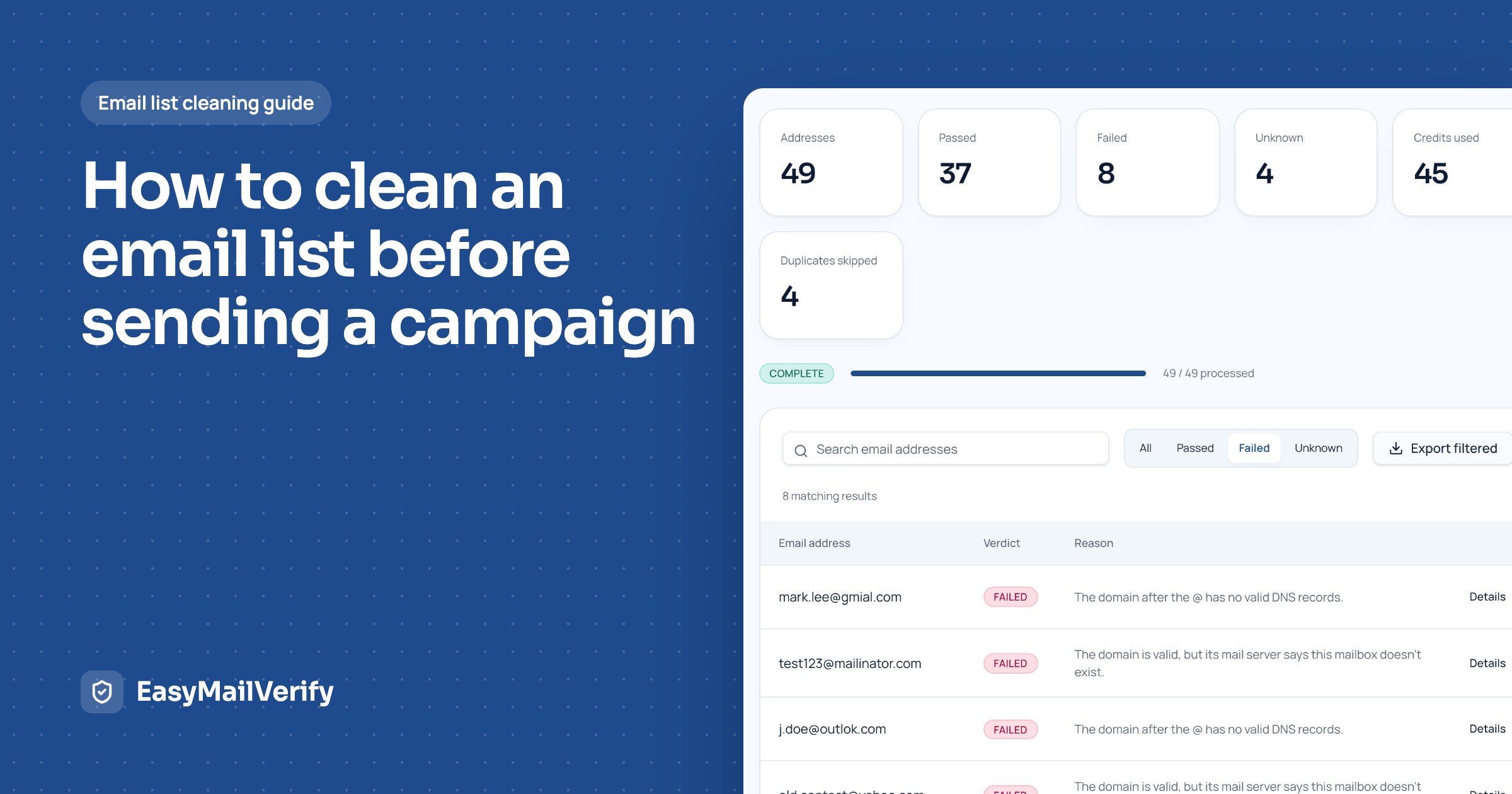
Before you send a marketing campaign, newsletter, product update, or cold outreach sequence, your email list should be checked for invalid, risky, duplicate, and outdated addresses. A clean list helps reduce bounce rate, protects sender reputation, improves deliverability signals, and gives you cleaner campaign data.
Many businesses focus on subject lines, design, and copy, but the quality of the list is just as important. If a large part of your list contains bad addresses, your campaign may bounce before people even see it. That can hurt performance across your email platform and make future campaigns harder to deliver.
Email list cleaning is the process of reviewing and verifying your contacts before sending. It helps you identify which addresses are safe to send to, which should be removed, and which need extra caution.
What Is Email List Cleaning?
Email list cleaning means removing or separating email addresses that can damage campaign performance. These can include invalid emails, misspelled domains, temporary inboxes, duplicate contacts, role-based addresses, and risky or unknown results.
A cleaned list gives you a better chance of reaching real people. It also helps you avoid wasting credits or email volume on contacts that are unlikely to receive your message.
Why You Should Clean Your Email List Before Sending
1. Reduce email bounce rate
A bounce happens when an email cannot be delivered. Hard bounces usually mean the address is invalid or does not exist. Soft bounces may happen because of temporary issues, such as a full inbox or server problem.
Too many bounces can signal to email providers that your list quality is poor. This can reduce trust in your sending domain and hurt future campaigns. Our guide to reducing email bounce rate covers more ways to keep bounces low.
2. Protect sender reputation
Sender reputation is one of the signals mailbox providers use when deciding where to place your email. If your campaigns repeatedly hit invalid addresses, spam traps, or risky inboxes, your sender reputation may suffer.
3. Improve campaign reporting
Bad emails distort campaign data. If a large part of your list is invalid, your open rates, click rates, conversion rates, and bounce reports become harder to understand. Cleaning first gives you more accurate data from a healthier audience.
4. Save money on email volume
Many email platforms charge based on list size, send volume, or contact count. Removing bad contacts before sending helps you spend on real opportunities, not dead records.
What Types of Emails Should You Remove or Review?
Invalid emails
These are addresses that do not appear to exist or cannot receive mail. They should usually be removed before sending.
Duplicate emails
Duplicates increase list size and can cause the same person to receive the same campaign more than once. Remove duplicate contacts before uploading or sending.
Disposable emails
Disposable or temporary emails are often used for one-time signups. They may not belong to real long-term customers and can reduce campaign quality. Learn more about disposable email detection.
Role-based emails
Addresses like info@, support@, sales@, or admin@ may reach a team inbox instead of one person. They are not always bad, but they should be reviewed depending on your campaign type.
Catch-all emails
Catch-all domains accept mail for many or all addresses at a domain, which can make verification less certain. These emails may need a cautious sending approach.
Step-by-Step: How to Clean an Email List Before Sending
Step 1: Export your list from your CRM or email platform
Start by exporting the contacts you plan to email. Use a simple CSV or TXT file when possible. Include the email address field and useful segmentation fields, such as source, signup date, customer status, or last engagement.
Step 2: Remove obvious formatting issues
- Remove blank rows
- Remove spaces before or after emails
- Make email addresses lowercase
- Remove duplicate rows
- Check for missing @ symbols
- Remove broken spreadsheet entries
If you use EasyMailVerify, duplicates are removed automatically when you upload, so you only pay to check each address once.
Step 3: Verify the list with a bulk email verification tool
Bulk email verification checks your list and tells you which addresses are safe to send to, which are invalid, and which can't be confirmed. This is faster and more reliable than checking addresses manually.
With EasyMailVerify, the workflow is simple: upload your CSV or TXT file, choose the column that holds the email addresses, verify the list, review the results, and download a cleaner version before sending.
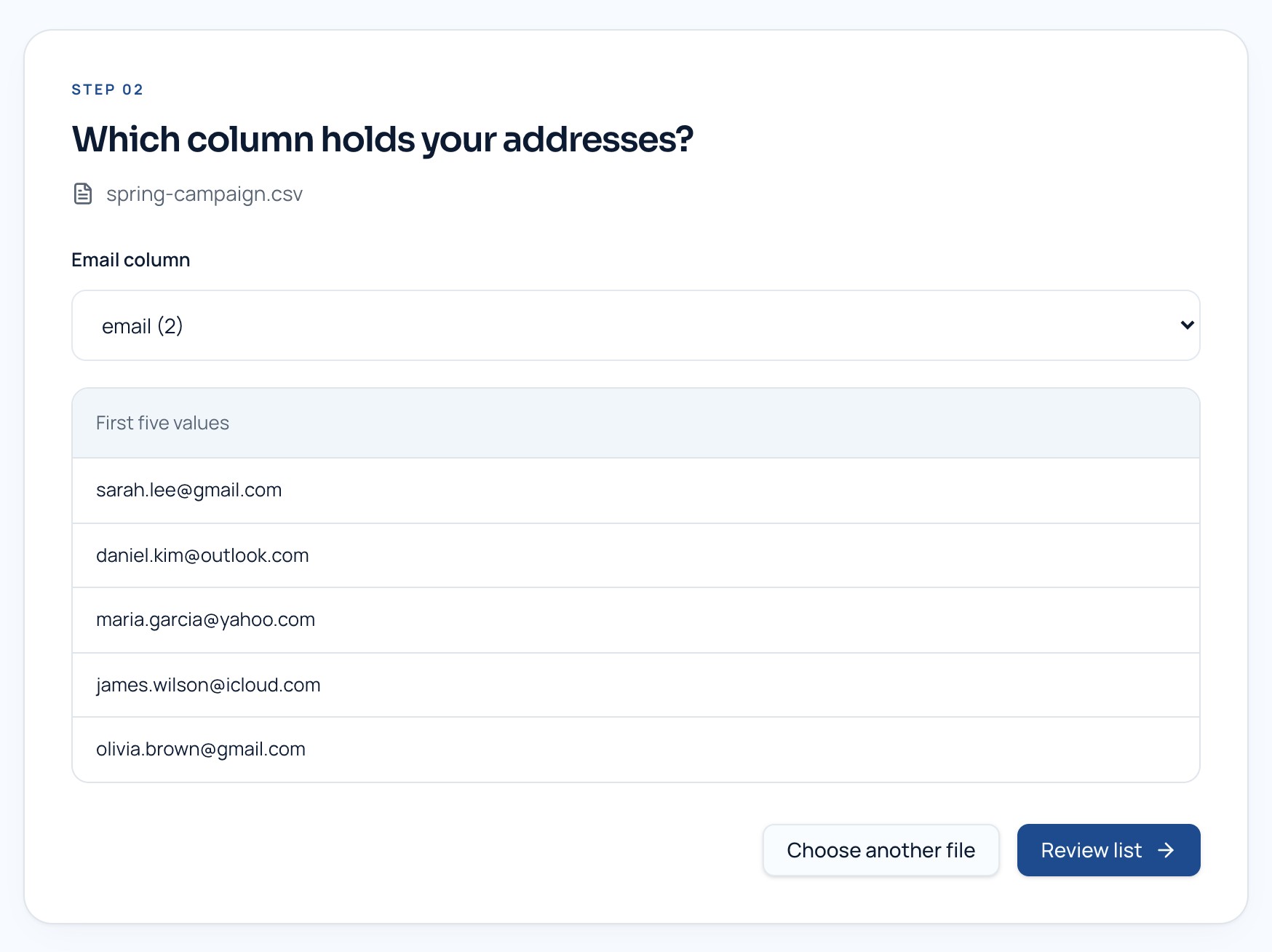
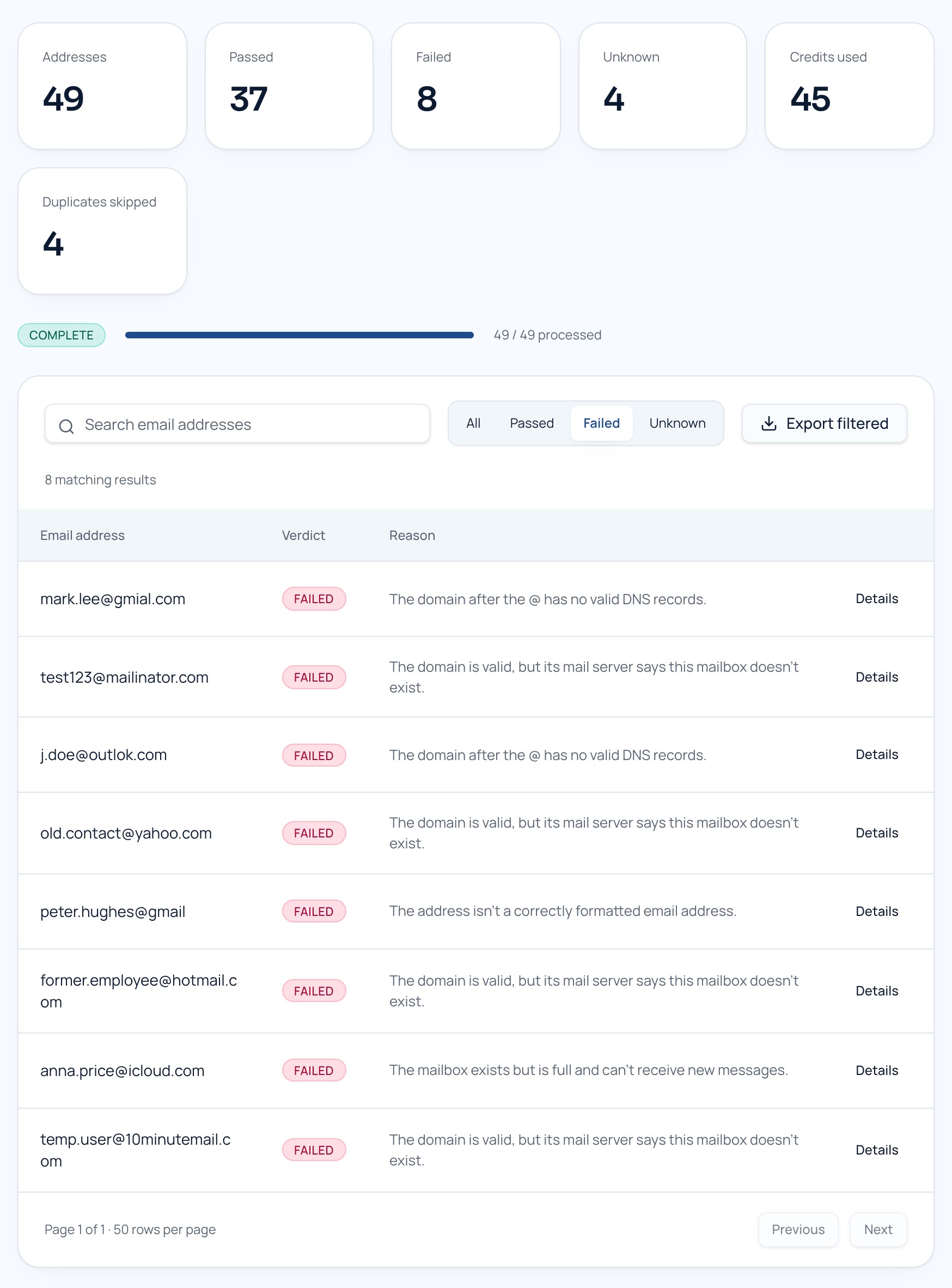
Every address comes back as Passed, Failed or Unknown, with a plain-language reason and flags such as disposable, role account, catch-all, or a suggested correction for typos like gmial.com.
Step 4: Remove invalid and disposable emails
After verification, remove emails that are clearly invalid or disposable. These addresses are unlikely to create value and may increase bounce risk.
Step 5: Segment risky and unknown results
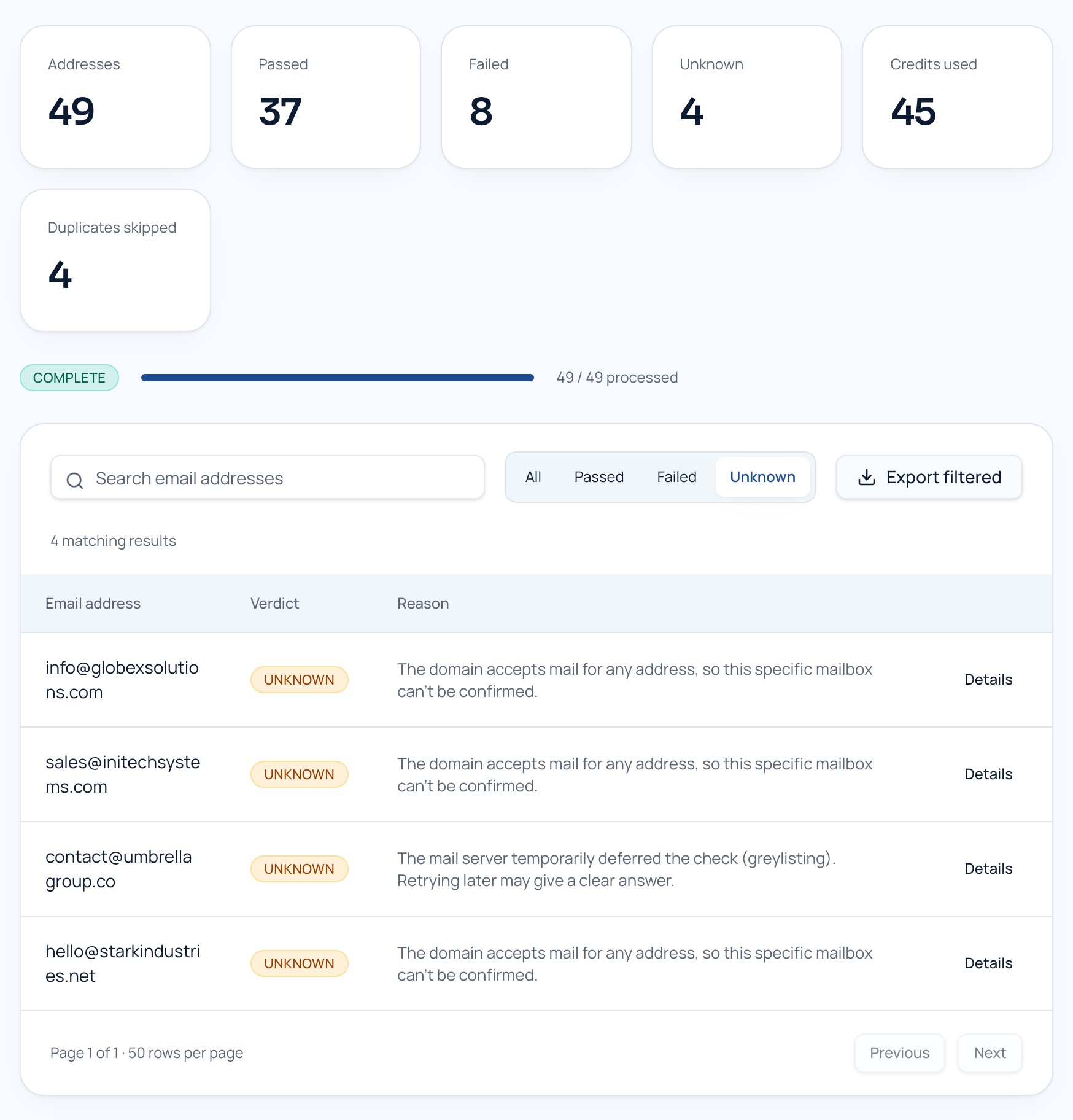
Risky, unknown, and catch-all results should not always be treated the same as valid emails. Create a separate segment for these contacts. You can exclude them from the first campaign or send to them more slowly with a conservative approach.
Step 6: Check engagement history
Verification tells you whether an email address appears technically usable. Engagement tells you whether the person is interested. Review contacts who have not opened, clicked, purchased, replied, or visited for a long time.
Step 7: Suppress unsubscribed and blocked contacts
Never send to people who unsubscribed or asked not to be contacted. Also suppress contacts that previously bounced, complained, or were manually blocked. Verification is not permission.
Step 8: Import the cleaned list back into your email platform
Once your list is cleaned, upload the valid segment back into your email platform. Keep risky or unknown contacts separate and name the list clearly so your team does not accidentally send to the old file.
Step 9: Send a small test batch first
For large lists, send in smaller batches before sending to everyone. Watch bounce rate, complaint rate, open rate, and click rate. If the first batch performs poorly, pause and review the list before continuing.
How Often Should You Clean Your Email List?
- Before every large campaign
- Before importing old CRM lists
- Before cold outreach
- Every 30–90 days for active marketing lists
- After lead generation campaigns or event imports
- Before sending to contacts older than 6–12 months
Email List Cleaning Checklist
- Export the correct contact list
- Remove duplicates and blank rows
- Fix basic formatting issues
- Verify the list in bulk
- Remove invalid emails
- Remove disposable emails
- Segment risky, unknown, and catch-all results
- Suppress unsubscribed and blocked contacts
- Upload only the cleaned segment
- Send a small test batch first
- Monitor bounce rate after sending
Common Mistakes to Avoid
Sending to an old list without verification
Old lists are one of the biggest sources of bounces. If a list has not been contacted recently, verify it before sending.
Keeping every contact because the list looks bigger
A bigger list is not always better. A smaller, cleaner list often performs better because it contains more reachable and relevant contacts.
Mixing valid and risky contacts in one campaign
If you mix all results together, you cannot easily see which group caused performance problems. Segment them before sending.
Ignoring suppression lists
Verification is not permission. Always respect unsubscribes, complaints, and suppression rules.
Final Recommendation
If you want better campaign performance, clean your email list before you send. Start with formatting cleanup, remove duplicates, verify the list in bulk, remove invalid and disposable emails, and segment risky results.
This process helps reduce bounce rate, protect sender reputation, improve reporting, and make every campaign more reliable.
With EasyMailVerify, you can verify single emails, upload bulk CSV/TXT lists, or use the email verification API to check emails before they enter your system. Credits are pay as you go and never expire; see pricing for the packages, or browse the FAQ for more answers.
FAQ
What does it mean to clean an email list?
Cleaning an email list means removing or separating invalid, duplicate, disposable, risky, and outdated email addresses before sending a campaign.
Should I clean my email list before every campaign?
You should clean your list before large campaigns, cold outreach, old-list reactivation, CRM imports, and whenever your list has not been checked recently.
Can email list cleaning reduce bounce rate?
Yes. Removing invalid and risky emails before sending can help reduce bounce rate and improve campaign quality.
What is bulk email verification?
Bulk email verification checks many email addresses at once and identifies which addresses are valid, invalid, disposable, risky, or unknown.
Should I delete all risky emails?
Not always. Risky or unknown emails can be segmented and tested carefully instead of mixed into the main campaign.
- email list cleaning
- bulk email verification
- bounce rate
- sender reputation